Tool descriptions that make the agent pick the right one
An agent chooses a tool by reading its description. Here is what a good one says, and how Claude writes the first draft for you.
1 min read

In this article
An agent does not see your code. When a user asks a question, it picks a tool by reading the descriptions. A vague description means the wrong tool, or no tool at all.
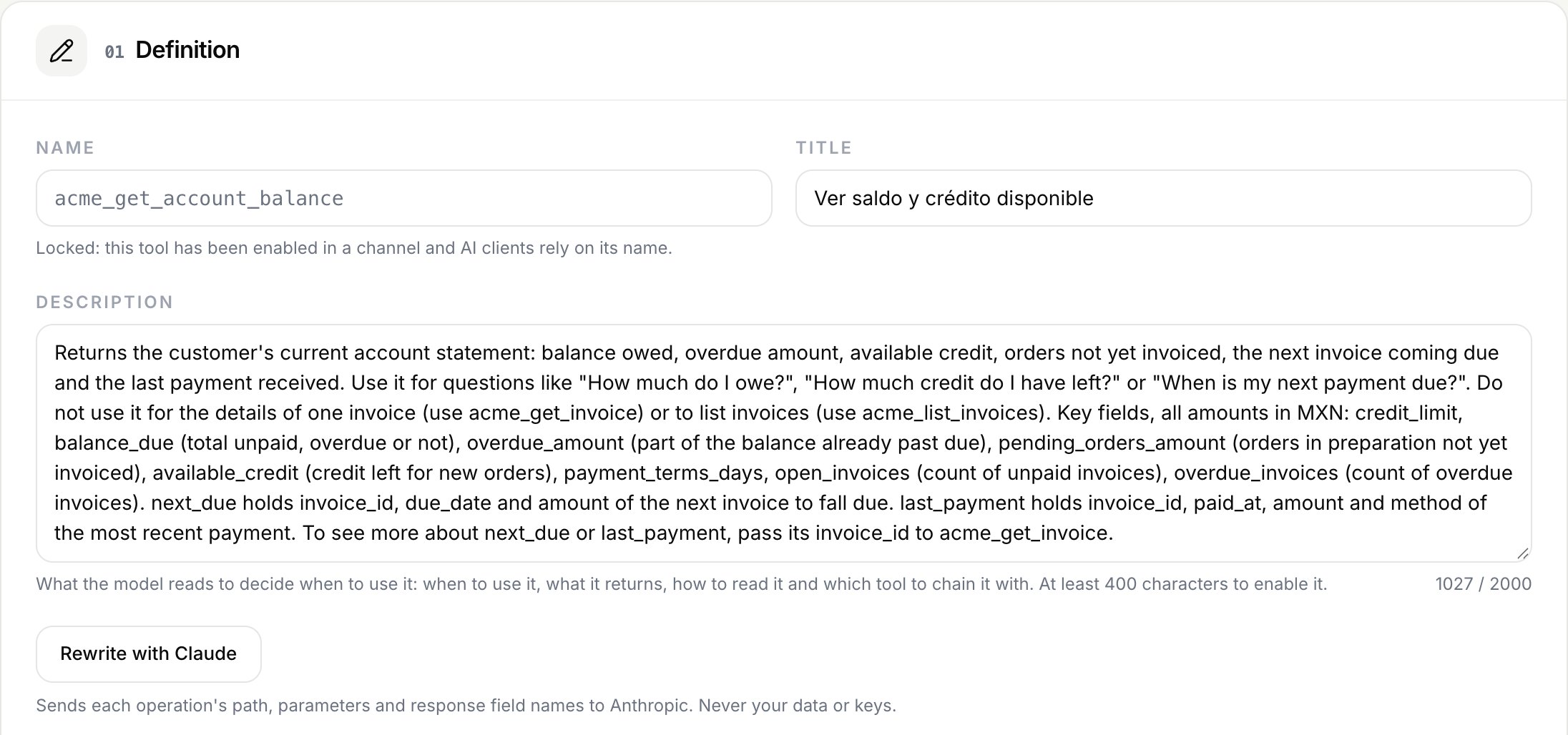
What a good description says
- When to use it. The questions it answers, in the words your users use.
- What it returns. The fields that matter and how to read them.
- What not to use it for. Which other tool to call instead.
- What to chain it with. For example, an invoice id that another tool can open.
Connect asks for at least 400 characters before a tool can be enabled, because shorter descriptions rarely cover all four.
Claude writes the first draft
Claude reads each operation's path, parameters and response field names. Never your data, never your keys. It drafts the description and you review it before anything is published.
Test before you enable
A tool only goes live after a successful call against your API with a test credential. If you change the path or the parameters, the test is cleared and the tool is switched off until you run it again.
- #claude
- #tools
Your API, ready for AI agents
Turn your endpoints into tools for Claude, ChatGPT and WhatsApp.